
-739-384.png)
Works InfoStay informed about the work being carried out in the city, whether it involves road repairs, infrastructure maintenance, work on the water network, or park redevelopment. For any questions or to report an issue related to the work, please call 514-694-4100. |
2026-10-09
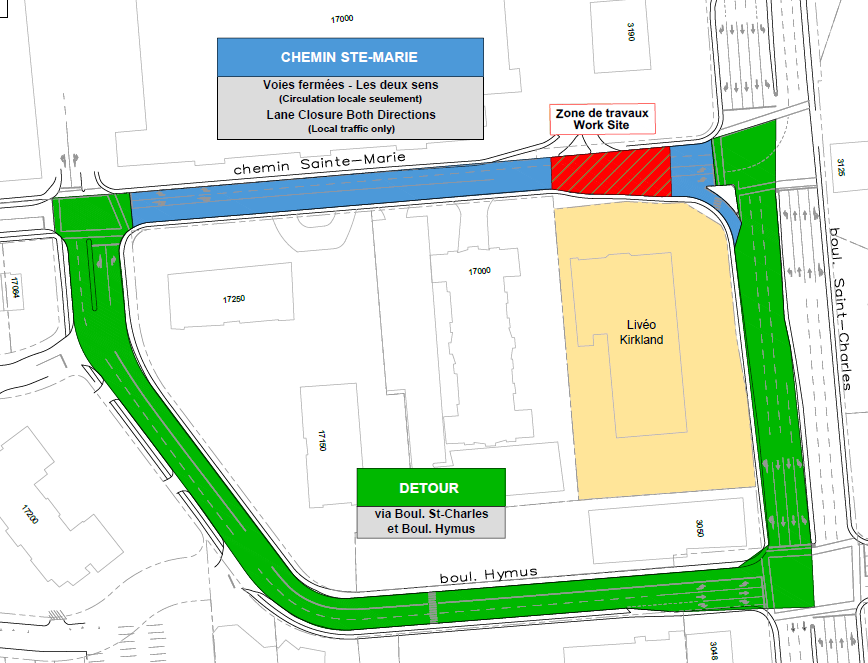
Closure of Chemin Sainte-Marie from October 13 to 21Chemin Sainte-Marie between Boulevard Saint-Charles and the first entrance to the Walmart shopping centre will be completely closed to traffic from Tuesday, October 13 to Wednesday, October 21, inclusive.
Closure of Chemin Sainte-Marie from October 13 to 21As part of work being carried out by contractor Sotramont, the section of Chemin Sainte-Marie between Boulevard Saint-Charles and the first entrance to the Walmart shopping centre will be completely closed to traffic from Tuesday, October 13 to Wednesday, October 21, inclusive. Despite the closure, access to the shopping centre where Walmart is located, as well as to the underground parking garages of the residential buildings on Chemin Sainte-Marie, will remain available via East Hymus Boulevard. A detour route will be clearly marked to guide motorists. We thank residents and businesses in the area for their understanding and cooperation throughout the duration of the work.
|
|
2026-10-09
Watermain Work on Brunswick Blvd. - Fire Hydrant ReplacementWatermain Work on Brunswick Blvd. - Fire Hydrant Replacement
|
|
|
2026-08-28
Street Lighting – Replacement of lamppostsNature of the work: Replacement of lampposts to convert the old lighting source to LED.
|
|
|
2026-06-29
Reconfiguration of the merge lane onto Saint-Charles Boulevard South at the Sainte-Marie Road East intersectionReconfiguration of the merge lane onto Saint-Charles Boulevard South at the Sainte-Marie Road East intersection, starting June 29.
|

Parking for Residents - Kirkland REM Station
Kirkland REM Station
200 Parking Spaces Reserved for Kirkland Residents
In order to facilitate access to the REM for its residents, the Town of Kirkland has entered into an agreement with the owner of a privately owned site adjacent to the Kirkland REM station, providing access to 200 parking spaces for a fee, reserved exclusively for Kirkland residents.
About the Parking Area
The parking area reserved for Kirkland residents wishing to use the REM is located in the western portion of the RioCan shopping centre, south of the Kirkland Colisée Cinema.
A secured pedestrian pathway connects the parking area to the Kirkland REM station.
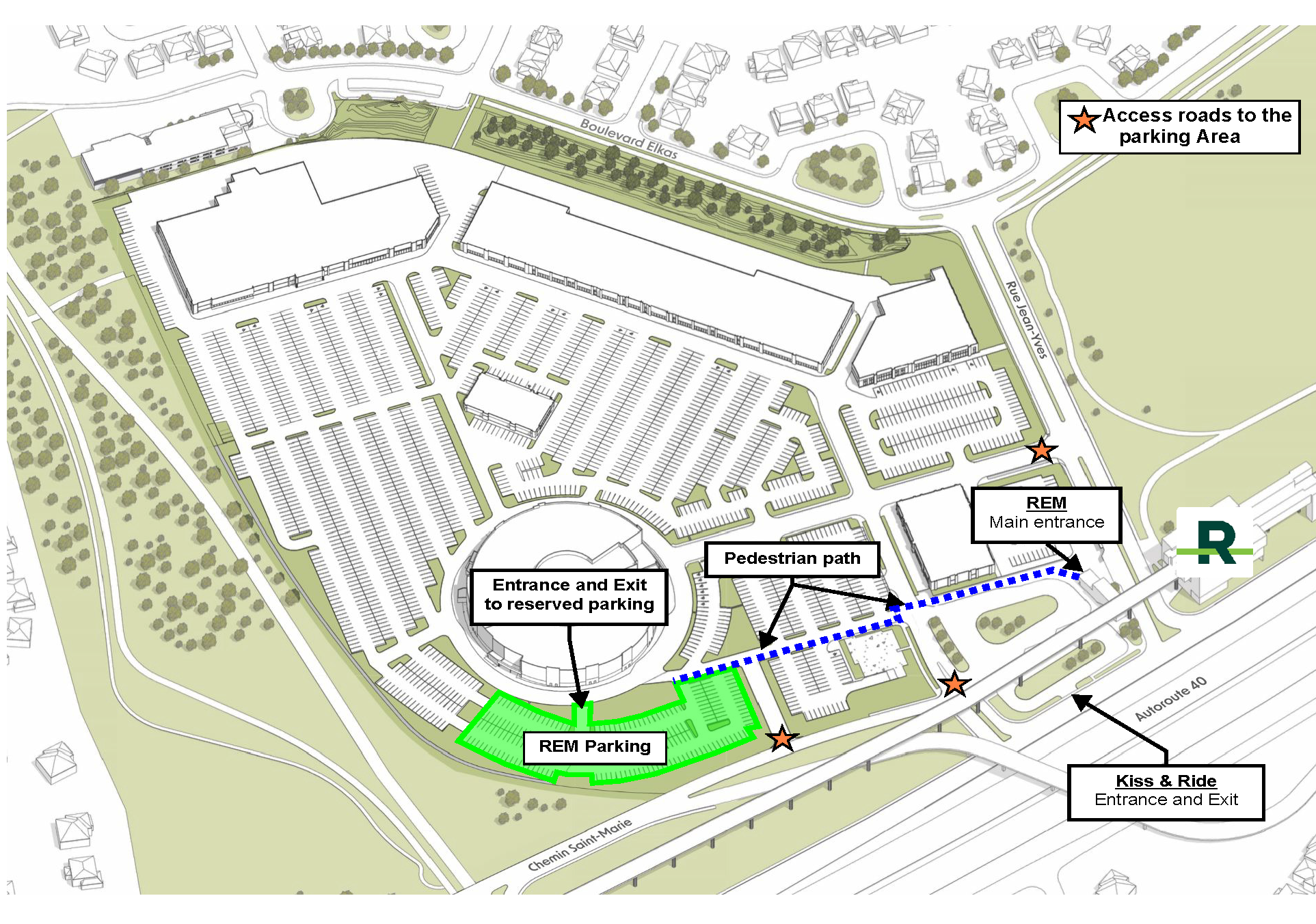
This parking area is intended EXCLUSIVELY for Kirkland residents who wish to park their vehicle and travel onward using the REM.
Its use requires the completion of two essential preliminary steps - one through the Town of Kirkland’s website, and the other through the ClickNpark application used by the site owner.
| Any resident wishing to use the parking area reserved for Kirkland residents must first complete the following two prerequisite steps: STEP 1 : On the Town of Kirkland website :
STEP 2 : Through ClickNpark :
|
The first step includes two interrelated sub-steps to be completed on the Town’s website at www.ville.kirkland.qc.ca:
- Create your resident profile (user account) – Step 1A
- Register your vehicle – Step 1B
Both steps must be completed by the resident through the Town’s Online Permit portal.
Please note: To access the portal, you may create an account using your own email address or sign in with a Google, Facebook, or Microsoft account.
About the Online Permit Portal
The Online Permit portal also allows Kirkland residents to submit applications for various municipal permits and authorization certificates, for example for tree cutting, driveway repairs, or the installation of a pool or spa.
Steps 1A and 1B must be completed through the same user account (resident profile)
Whether you need to create a resident profile or simply log into an existing user account to register your vehicle, the entire process is completed through the Town’s “Online Permit" portal.
- If you do not have an active user account, follow the instructions to create your resident profile;
- If you have an active user account, log in to register your vehicle.
Once your resident profile has been created, proceed to Step 1B to register the vehicle(s) you may use to park in the residents-only parking area.
Registering your vehicle is a mandatory step, as access to the parking area is controlled through license plate recognition. From your resident profile (user account), you can register one or more vehicles and submit the required documentation.
REGISTER YOUR VEHICLE
Access to the parking area is controlled by automated license plate recognition. As such, any vehicle — car, motorcycle, or scooter — that a resident wishes to park in this area must be registered in advance with the Town of Kirkland, through the Town’s "Online Permit" portal.
Vehicle registration is completed through your resident profile (user account).
Required Documents
When registering a vehicle, you must submit:
- a photo or a copy of the vehicle registration certificate;
- a photo or a copy of the front and back of your driver’s licence (to confirm your Kirkland residential address).
Tip: Make sure all photos are clear and legible (clear text, no glare) to avoid refusal or processing delays.
Confirmation Email Required
Once your vehicle has been registered, you will receive an email from the Town confirming that your registration has been approved. This email is required in order to proceed to the next step—reserving a parking space and paying the applicable fees through the ClickNpark* application used by the property owner.
*Note: Online reservations on the ClickNpark platform will be available the week of May 11.
PLEASE NOTE :
- You must wait for the Town’s confirmation email.
- Without this email, it is not possible to make a reservation in ClickNpark (Step 2).
Steps 2A and 2B are completed using the ClickNpark application, which is operated by the owner of the parking site
Once your vehicle registration has been validated by the Town of Kirkland (confirmation email received), reservations and payments are made directly with the site owner, as the parking area is located on private property.
This step is completed exclusively through the ClickNpark* application, an external platform not managed by the Town of Kirkland.
- Step 2A – Reserve a parking space
- Step 2B – Pay the applicable fees
*Note: Online reservations on the ClickNpark platform will be available the week of May 11.
To Download the Application or to Reserve Online:
Create Your ClickNpark Account
Once the application is installed on your mobile device, create your ClickNpark account by following the on-screen instructions. You will then be able to reserve a parking space, complete payments, manage your reservations, and obtain assistance related to parking usage (private property).
Once your vehicle has been validated (confirmation email received) and your ClickNpark* account has been created, you may reserve a parking space.
*Note: Online reservations on the ClickNpark platform will be available the week of May 11.
In the ClickNpark application:
- Associate an authorized vehicle with your reservation (for which the Town has issued approval).
- Select the date and time of arrival.
- Check availability.
- Choose the available reservation duration / block.
- Confirm the reservation (you will then be directed to the payment step).
Important: A reservation is required. Availability may vary depending on demand.
Once your space has been reserved, proceed to Step 2B to complete the payment and confirm your reservation.
Parking fees are paid through the ClickNpark application at the time of reservation, using the available payment methods. Once payment has been completed, the reservation is confirmed in the application.
Please note:
ClickNpark is an external platform not operated by the Town of Kirkland. Payment terms, receipts, cancellations, and application settings are managed by the service provider.
The parking area reserved for Kirkland residents is managed by the site owner, as it is private property. Parking space reservations and payments are handled exclusively through the ClickNpark application. This section outlines the applicable terms, including pricing, reservation duration, booking limits, and usage rules.
Pricing
Rate: $8.45 + taxes per 24-hour block.
Fees are payable at the time of reservation through the ClickNpark application.
Reservation Duration (24 hours)
Each reservation corresponds to a 24-hour block, starting from the arrival time selected in the application.
The reservation ends as soon as the vehicle exits the parking area, even if the full 24-hour block has not been used (no re-entry).
Usage Rules Related to Reservations
- Within the same reservation block, a vehicle may not enter and exit the parking area more than once.
- Any exit automatically ends the active reservation; a new reservation is required for any subsequent re-entry (subject to availability).
Reservation Limits and Availability
- A vehicle may hold a maximum of three (3) simultaneous reservations.
- Reservations may be made up to 14 days in advance.
Access and Control
Access to the parking area is controlled by automated license plate recognition at both the entrance and exit of the site. Only vehicles validated in advance (Town confirmation email received) are authorized to reserve a parking spot.
Please note:
Terms related to payment methods, cancellations, receipts, and application settings are managed by ClickNpark and its service provider.
If you are not comfortable using the internet or are unfamiliar with online registration processes, please feel free to contact our Administration team at 514 694-4100, Monday to Friday, from 8:30 a.m. to 12 p.m. and from 1:00 p.m. to 4:30 p.m. We will gladly guide you through the process.
Outside of these hours, you may also contact the Municipal Patrol at 514 630-1234.
We will be happy to assist you and help find a solution so that you can complete your registration.
KEY POINTS TO REMEMBERBEFORE PARKING
|